How RFP Software Works: TenderOS Stage by Stage
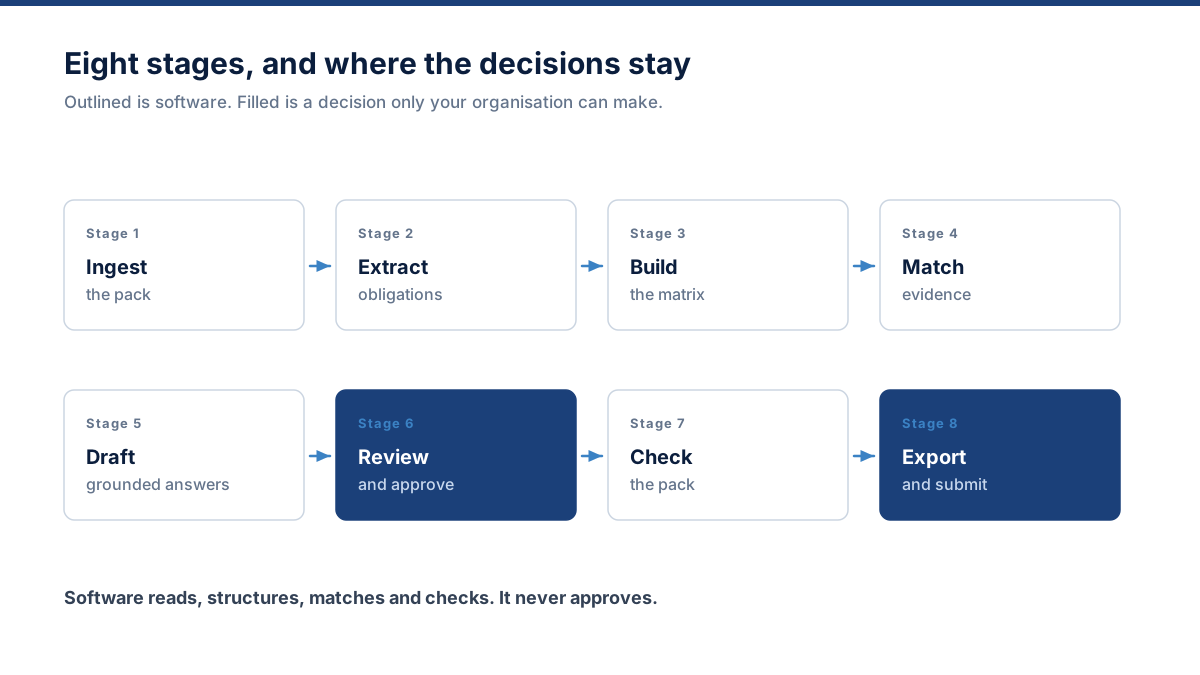
This is how RFP software works when it covers the whole bid: eight stages between the document landing in your inbox and a validated submission package leaving it. The software does the reading, structuring, matching and checking; your organisation keeps every decision that carries commercial or legal weight — under a regime like the Procurement Act 2023 an evaluator scores what you actually submitted, so no stage here signs anything on your behalf.
Intake and classification
You add the tender pack as the buyer sent it. TenderOS classifies each file — main RFP, terms and conditions, technical specification, commercial template, form, addendum, annex, instruction, contract — because a requirement in the pricing template preamble behaves differently from one in the scope of work. Duplicate uploads are detected by hash so the same document is never processed twice.
- Security validation, MIME checking and malware scanning before anything is parsed
- Native text extraction preferred; OCR used only where the document is image-based
- Document structure preserved: pages, headings, tables, paragraphs and clauses
- Where OCR is used or parse confidence is low, the source is flagged for review rather than treated as exact
Requirement extraction
Every clause that asks you to do, provide, prove or accept something becomes a tracked requirement. Obligation language is matched by explicit rules, then classified and normalised. The buyer’s original wording is stored verbatim alongside the plain restatement your team works from — the original is what you will be held to.
- Mandatory, scored, eligibility, technical, commercial, legal, security, financial and submission categories
- Requirement types: pass/fail, response required, evidence required, form required, acknowledgement, contractual acceptance
- Page, section and clause identifier retained on every row
- Schema validation, duplicate checks and date-consistency checks on every extraction
Qualification
Before anyone writes, Bid Fit compares what the tender demands against what your organisation can actually prove: eligibility conditions, mandatory certifications, available references, geography, timeline and resource. It returns strong, conditional or weak fit with the specific reasons — never a probability of winning.
- Hard gates surfaced first: certifications, turnover thresholds, bonds, compulsory attendance
- Reference and case-study coverage measured against what the buyer asks for
- Deadline reality checked against the volume of work the pack implies
- The reasons matter more than the verdict — each one becomes a task with an owner
Evidence matching
Each requirement is searched against your Company Brain using both keyword and semantic retrieval. You get strong, possible and weak matches rather than a false-precision score, plus an explicit "no evidence found" where nothing supports the requirement. Expired certificates are flagged, never used silently.
- Hybrid retrieval — embeddings alone miss exact terms like a standard number or a client name
- Retrieval always filtered by organisation, so one customer’s knowledge can never reach another
- Certificate, licence and insurance expiry tracked against the tender’s validity date
- Contradictions between two of your own documents are surfaced, not silently resolved
Grounded drafting
Responses are generated from the requirement text, the surrounding clauses, your approved evidence and your instructions. Where a factual company claim has no support, the draft returns an explicit marker and a specific question instead of a plausible sentence. Word and page limits stated in the tender are enforced where they can be detected.
- Every material company claim carries a source evidence reference or an explicit user input
- Responses labelled grounded, partially grounded or needs input
- Concise, standard or detailed length; technical, executive or compliance-focused tone
- Regenerate, shorten, expand, make more technical, add evidence, mark approved
Review and approval
Requirements are assigned to the people who can actually answer them — security questions to the security lead, commercial clauses to finance, contract terms to legal, architecture to the solution lead. Comments, review status, approvals and version history sit on every response, and no approval happens without automated checks running first.
- Pre-approval checks: unsupported claims, contradictions, expired evidence, coverage, word limits, missing attachments
- Optimistic locking so two editors never silently overwrite each other
- Autosave on responses and comments
- Any prior version of a response can be restored
Change control
When an addendum arrives, TenderOS compares it against the tender already in the workspace and reports what moved: new clauses, removed clauses, changed deadlines, revised requirements, altered evaluation criteria — and critically, which of your already-approved responses the change affects.
- Version comparison across the whole pack, not just the amended file
- Affected responses listed by name so nothing quietly goes stale
- Deadline changes propagate to the task dates that depended on them
Submission validation and export
The final check is arithmetic you can audit: mandatory items complete, blockers open, responses awaiting approval, expired documents, unassigned mandatory requirements. Then the exports — proposal DOCX, compliance matrix XLSX, submission checklist, risk register, clarification questions and response workbook.
- Completeness measured transparently; no readiness figure you cannot reconstruct by hand
- Submission instructions extracted: channel, format, naming, copies, signatures, page order
- Exports queued asynchronously so a large pack does not block the interface
- The workflow ends at a validated package — uploading to the buyer portal stays a human action
Where the software stops and your organisation starts
Automation that quietly makes commercial decisions on your behalf is not a feature. These are the lines TenderOS does not cross.
The software does
- Read and structure the whole document pack
- Find and classify every obligation
- Track dates, documents and eligibility gates
- Search your evidence and name the gaps
- Draft from approved material with sources attached
- Check completeness and produce the exports
Your organisation does
- Decide whether to bid
- Confirm what the company can truthfully claim
- Take the legal and commercial judgements
- Approve every response before it goes out
- Price the work
- Press submit on the buyer’s portal
Stage one runs in your browser, free
Paste a tender and see the structure the pipeline starts from — requirements, mandatory clauses, requested documents, dates and flags — before deciding whether the rest is worth it.